✅ Prednosti
- Weight of 56 grams
- Three connection methods
- OLED display
- Charging station
- Large surface area of the pad
❌ Nedostaci
- Sensor is not high-end
- Five buttons limit application
- Software lacks advanced features
- Black surface shows dust
- No RGB lighting on the pad
GAWAIN weighs only 56 grams, features three connection modes, a sensor with a resolution of up to 12,000 DPI, an OLED display, and its own charging station. SHIKORO XL adds a large, simple, and functional surface measuring 900 × 400 millimeters.
On paper, it sounds like a very ambitious set. Even more interesting is that the mouse's price in local stores ranges from about 31 to 36 euros, while the pad can be found for approximately 13 to 15 euros.
Design without unnecessary exaggeration
GAWAIN looks modern but does not venture into an overly aggressive gaming aesthetic. It is available in black and white versions, and its relatively clean design allows it to fit seamlessly into an office setup.
The casing is made of ABS plastic, while the dimensions of 121 × 70 × 41 millimeters are suitable for users with medium to slightly larger hands. At only 56 grams, GAWAIN belongs to the category of ultra-light mice, which is particularly noticeable in fast FPS games and during use at lower sensitivity.
Unlike many ultra-light models, GAWAIN does not have a perforated casing. This means it retains a classic look and does not collect dust through openings, while still remaining light enough for quick movement.
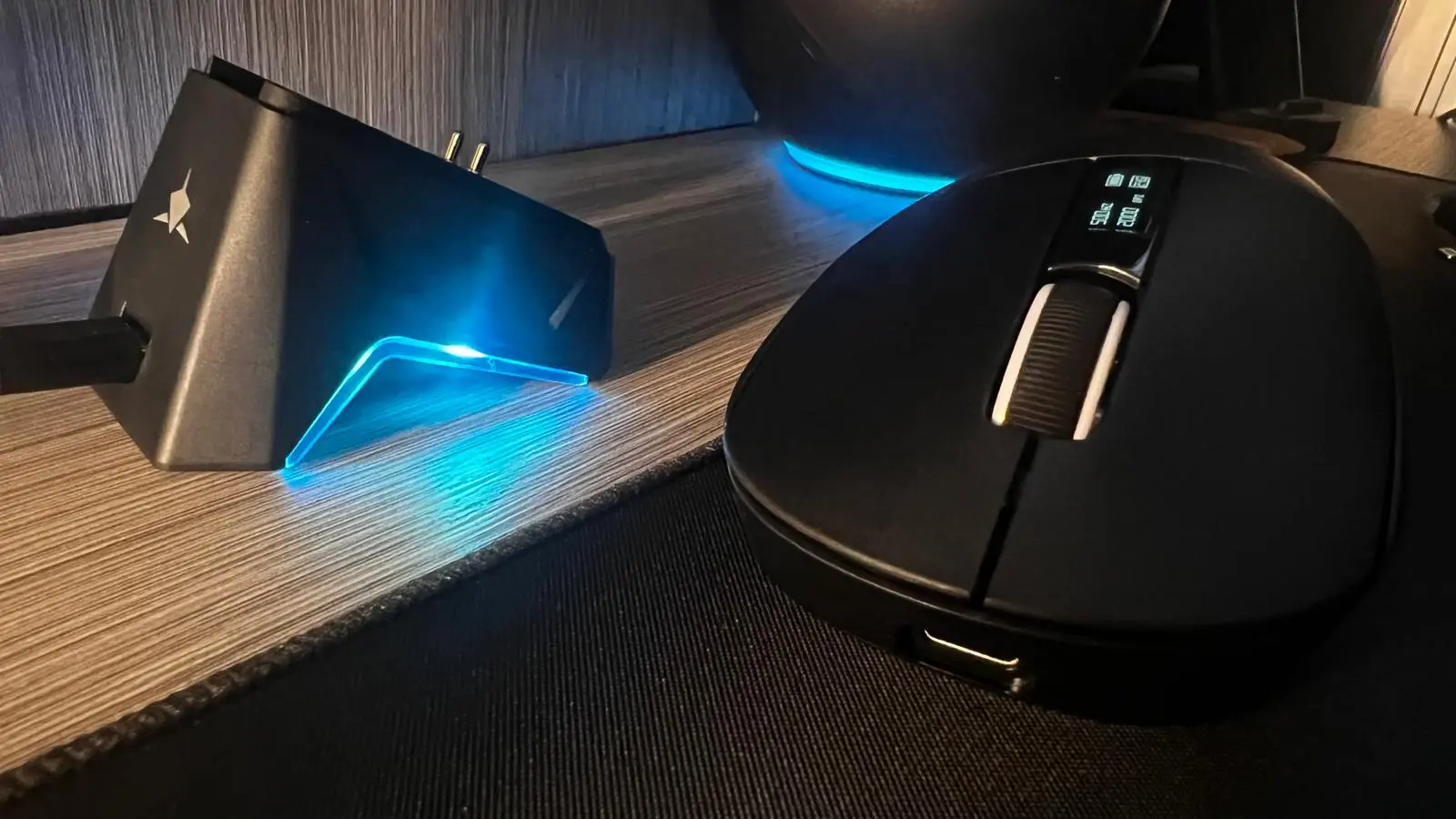
The most interesting detail is located on the top of the mouse. A small OLED display can show basic information such as the current DPI value, connection mode, and battery status. It is not a feature that is essential, but it is more practical than yet another RGB strip that we wouldn't see during use anyway.
Three connection modes
GAWAIN supports Bluetooth 5.2, a 2.4 GHz wireless connection, and traditional USB connectivity.
For gaming, the 2.4 GHz connection is predictably the best choice as it allows for a polling rate of up to 1,000 Hz. Bluetooth is convenient for connecting to a laptop, tablet, or other device where ultra-low latency is not a priority.
The option to use it via cable is an additional assurance if the battery runs out in the middle of a game. The user is not forced to stop playing and wait for the mouse to charge.
In this price category, we often only get one form of wireless connectivity, which is why GAWAIN's combination of Bluetooth, USB receiver, and wired operation is one of its greatest advantages.
The charging station is not just a decoration
The package includes a lit charging station with a USB-C connector. The mouse is simply placed on it after use, reducing the chance of forgetting to charge it.
The station also serves as a visual addition to the setup. RGB lighting is located on the station itself, not on the entire mouse casing, which is a good compromise between gaming aesthetics and a clean, unobtrusive look.
The built-in lithium-polymer battery has a capacity of 500 mAh. White Shark does not specify the exact declared battery life in hours, so autonomy will depend on the chosen connection mode, polling rate, and use of the OLED display.
However, the station significantly alleviates this problem. Instead of occasionally searching for a cable, we naturally return the mouse to the place where it charges after use.
PAW3311 sensor: sufficient for most gamers
At the heart of GAWAIN is the PixArt PAW3311 optical sensor with a maximum resolution of 12,000 DPI, tracking up to 300 IPS, acceleration up to 35 G, and a polling rate of 1,000 Hz.
The number of 12,000 DPI looks good on the box, but most users will play between 400 and 3,200 DPI. It is much more important that tracking is consistent and that the mouse does not exhibit unwanted acceleration or cursor skipping during fast movements.
PAW3311 is not a high-end sensor found in the most expensive competitive mice. However, in this price range, it offers quite enough performance for everyday gaming, including shooters, MOBA titles, strategy games, and action games.
Professional esports players will likely seek a more advanced sensor and a polling rate above 1,000 Hz. For the average player, the difference will be significantly less important than the weight, shape, and quality of the surface.
Buttons and Software
GAWAIN uses HUANO switches rated for 20 million presses. There are five buttons available, including two side buttons, and functions can be adjusted through White Shark's software.
The software allows changing DPI steps, polling rate, and button functions. It does not offer the ecosystem depth of Logitech, Razer, or Corsair, but it covers settings that most users will actually use.
Five buttons are sufficient for FPS games and everyday work. MMO gamers or those engaged in more complex simulations will, however, miss a larger number of additional controls.
On the bottom side, there are UPE gliders. Combined with a weight of 56 grams and an appropriate textile surface, they allow for smooth and fast movement without the feeling that the mouse is snagging on the surface.
SHIKORO XL: Enough space for everything
SHIKORO XL, measuring 900 × 400 millimeters, covers a large part of the desk. It easily accommodates a keyboard and mouse, with enough space for wide hand movements.
The pad is three millimeters thick, has a smooth waterproof textile surface, stitched edges, and a non-slip base made of cellular rubber.
The surface is tuned as a compromise between speed and control. The mouse does not feel sluggish, but the pad provides enough resistance for precise cursor stopping. This balance suits a wide range of games and sensitivity settings.
The non-slip rubber base is a good solution for fast movements as the pad should not move along with the hand. Stitched edges are also important for durability as they reduce the possibility of the textile layer separating from the rubber base. White Shark lists a five-year warranty for SHIKORO.
Visually, SHIKORO is very simple. The black surface has no RGB lighting, large graphics, or aggressive logos. This may not attract users who want a maximally colorful setup, but the pad looks neat and will not visually clash with the rest of the equipment.
How do they work together?
GAWAIN and SHIKORO XL make a logical combination. The lightweight mouse works best on a sufficiently large surface that allows for long, fast movements without hitting the edge of the pad.
This is especially useful for players who use lower DPI and move the mouse with their entire forearm. The dimensions of the pad leave enough space for such a playing style, while the controlled textile surface makes precise stopping easier.
The set makes sense for users who work during the day and play in the evening. GAWAIN can connect via Bluetooth to a work laptop and via a 2.4 GHz receiver to the main gaming computer. Switching between devices is thus simpler than with a classic wireless mouse with a single connection method.
Where are the compromises made?
The biggest compromise is the sensor. PAW3311 is decent, but it is not on the level of the sensors found in more expensive competitive models. For players already using the premium mouse GAWAIN, it probably won't represent an upgrade.
The five buttons also limit its application in MMO games and programs where the user wants a large number of shortcuts on the mouse.
The software is functional, but lacks the advanced integrations and features offered by the biggest peripheral manufacturers. The OLED display and charging station partially compensate for this shortcoming, but do not change the fact that this is a budget product.
SHIKORO XL has no significant functional shortcomings. One should only consider that it will take up almost the entire width of a smaller desk. The black textile surface will also show dust and signs of use over time, which will require occasional cleaning.
Conclusion
White Shark GAWAIN is not a mouse that tries to outdo the most expensive Logitech, Razer, or Pulsar models in raw competitive performance. Its strength lies in the number of features it offers for relatively little money.
Weighing 56 grams, three connection modes, a polling rate of 1,000 Hz, an OLED display, software customization, and a charging station make it a package that is hard to find at a price of around thirty euros.
SHIKORO XL is a simpler product, but it does its job well. The large surface, stitched edges, anti-slip base, and good balance between speed and control make it a quality addition that won't unnecessarily increase the price of the entire setup.
Together, they cost less than many standalone mid-range gaming mice, and offer a complete and visually cohesive solution for work and play.
GAWAIN is easiest to recommend to users who are buying a more serious wireless gaming mouse for the first time or want a lightweight model without a large investment. For professional esports, there are better and more expensive choices. For everyone else, this is a very well-balanced ratio of price, functionality, and everyday usability.
-hero.webp)


























-hero.webp)